
2. Trial, plans and payments
2. Trial, plans and payments
leaforder.com is billed by the number of active SKU annotations, that is, the number of product codes actually made clickable in your catalogs (not by the number of pages or documents). Payments are handled through Stripe.
2.1 The trial period
A 14-day trial starts automatically at registration.
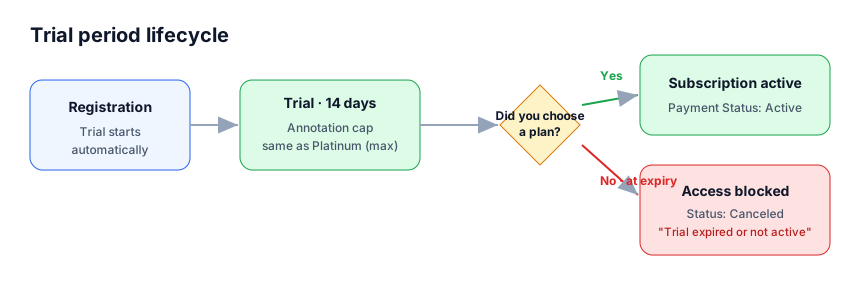
- During the 14 days you can try all features and publish catalogs. If a catalog is very large you may reach the trial annotation limit (the catalog moves to the LimitReached status): in that case, subscribe to a paid plan to continue.
- When the 14 days expire, if you have not subscribed to a paid plan, the connection moves to the Canceled status and access to the upload and processing features is blocked, with a message saying that the trial or subscription has expired or is not active.
- When you subscribe to a paid plan, the trial is closed and the chosen plan takes over.
2.2 Plans and thresholds
The available plans and their cap on active SKU annotations are:
| Plan | Active annotation cap |
|---|---|
| Trial (14 days) | trial period (see §2.1) |
| Bronze | 1,000 |
| Silver | 10,000 |
| Gold | 1,000,000 |
| Platinum | 100,000,000 |
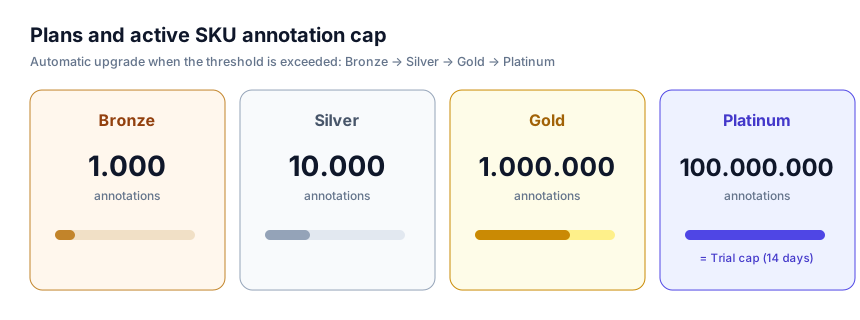
Why such widely spaced thresholds (10,000 → 1,000,000 → 100,000,000)? It is not a typo: the plans cover everyone from those with a few catalogs up to large multi-store catalogs. The automatic upgrade (below) means you always pay for the plan that fits your actual usage, without having to choose in advance.
Prices: plan prices are defined in Stripe and shown during checkout; see the Billing page of the panel for current values. This guide does not list prices, to avoid showing outdated figures.
Automatic upgrade when the threshold is exceeded
Every night an automatic process counts your active annotations and reports them to Stripe. If you exceed your plan’s threshold, the subscription is automatically moved to the next plan up (Bronze → Silver → Gold → Platinum), with a proportional adjustment on the invoice. You do not need to do anything: the service is not interrupted.
The annotation count is also reset on the first day of every month.
2.3 The Billing page
In the panel, the Billing section shows a card for each e-commerce connection with:
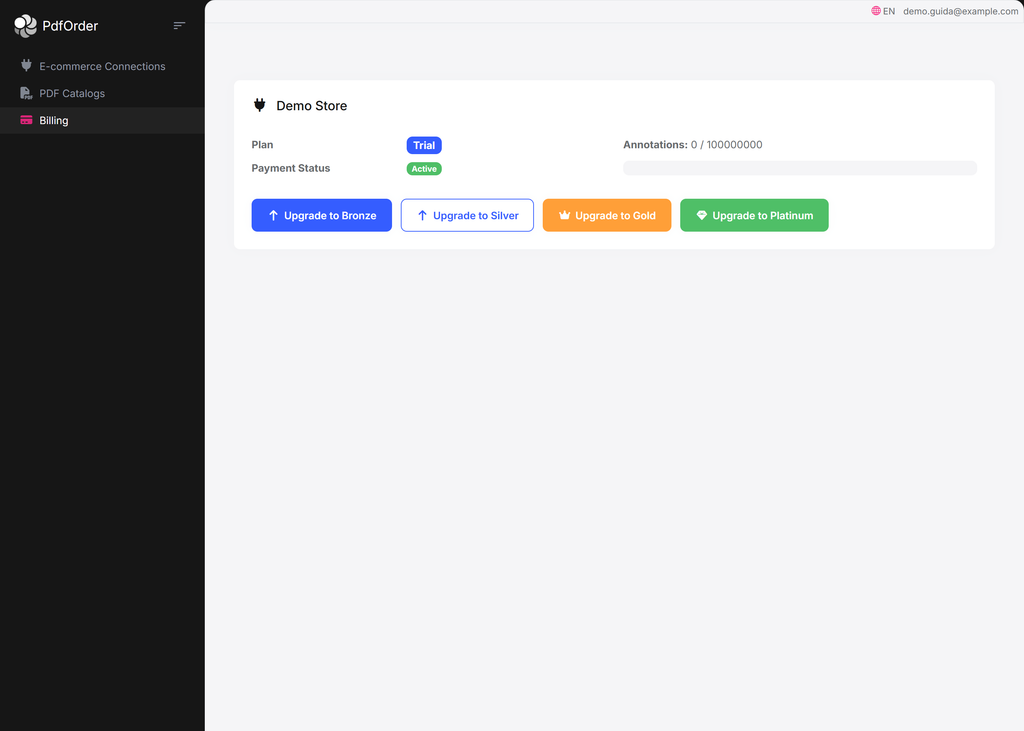
Real example of an account in trial: Trial plan, Active status, the annotation usage bar and the buttons to move to a paid plan.
- Plan — the active plan (with a Manual override badge if set by an administrator).
- Payment Status — the payment status (see table below).
- Renews / Expires — the subscription renewal or expiry date.
- Usage bar — Annotations: used / plan threshold. It is green below 70%, yellow from 70% and red from 90%.
- Alerts — a banner “Payment action required — uploads are blocked.” appears if payment has failed or is overdue (and you are not in trial).
Payment statuses (Payment Status)
| Status | Meaning |
|---|---|
| Active | Subscription (or trial) active: everything works. |
| Pending | Waiting for the payment to complete. |
| Failed | Payment failed: uploads are blocked. |
| PastDue | Payment overdue: uploads are blocked. |
| Canceled | Subscription canceled or trial expired. |
2.4 How to pay (Stripe checkout)
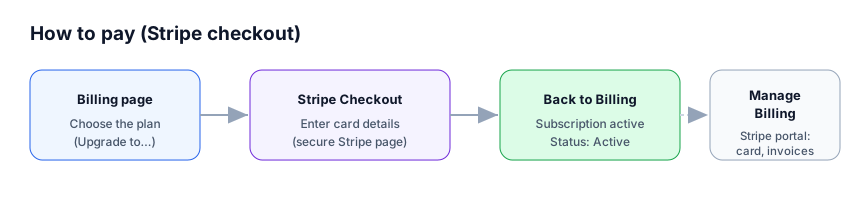
First subscription
- Go to the Billing page.
- If you have no active subscription (you are in trial or canceled), you will see the Upgrade to Bronze / Silver / Gold / Platinum buttons.
- Click the plan you want: you will be redirected to the secure Stripe Checkout page to enter your payment details.
- When finished, you return to the Billing page with the subscription active.
⚠️ Important (security): card details are entered only on the secure Stripe page. leaforder.com does not handle or store payment details.
Managing or changing an existing subscription
- Manage Billing — opens the Stripe billing portal, where you can update your card, download invoices or cancel the subscription.
- Upgrade / Downgrade to … — changes plan directly. An upgrade is immediate, with a proportional adjustment on the invoice.
- A downgrade is blocked if your active annotations exceed the cap of the target plan: in that case, first reduce the annotations (for example by removing catalogs) and try again.